3d Cartoon Dance Ai Video Editing – Let us show you something that’s going viral on Instagram. It features 3D characters, and that’s the best part. I’ll tell you that you can easily create videos like this. You just need to have an idea of how to make such videos. For this, we’ll need a reference video and learn how to use an AI tool to create our own video. If you want to learn and understand how this works, I’m going to explain it in this article. By following these steps, you can easily create this kind of video editing. Then let us know what results you got!
Details Of 3d Cartoon Dance Ai Video Editing
This video shows you the different types of videos you can find. It features large 3D characters that look exactly like us, and they dance in a way that makes it seem like we’re actually dancing there. We’ll learn how to convert our normal videos into this kind of edited video. Even if you don’t know how to dance like that, you can still create these kinds of dance videos. I’ll show you what you need to do and how to generate them. I’ll also explain the editing process. So, what do you want to do? If you want to create one, the process is explained further on. Just follow the steps and create your video.
Editing Process
So, first of all, in this editing process, you’ll need to understand that we require a reference video and a photo. Here’s how we’ll do it: First, we’ll use a reference video. You’ll find many amazing dancers on Instagram. You need to save one of their videos. You can ask for their permission first. After that, you need to convert your own photo into 3D. I’ll explain this conversion process further on. Make sure to read that section; your normal photo will be converted into a 3D image.
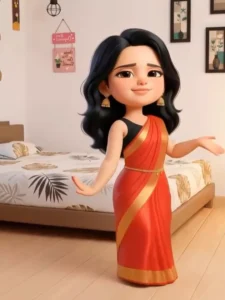
How To Create Image
To do this, go to Google Gemini and first paste the problem description there. Then, go to the plus option and upload your full photo – the one you want to use to create the dancing photo or video. Use the appropriate photo depending on whether you want a photo or a video. After that, click “Generate,” and in just a few seconds, it will convert your normal photo into a 3D image. Now, save this photo. I’ll explain the video creation process next.
Image Prompt:-
Create a 3D doll-style cartoon version of this photo.
Pixar-quality rendering, smooth skin, soft lighting,
big expressive eyes, realistic cartoon texture,
cinematic look, high detail, vibrant colors.
Video Prompt:-
A cute baby dancing exactly to the rhythm of the provided song, precise beat synchronization, joyful baby expressions, smooth natural movements, no exaggeration, realistic body motion, high resolution, social media reel style
How To Generate Your Video
As you know, you’ve already generated the photo. Now you need to generate the video. As I mentioned, you’ll need a reference video to generate the video, so keep that ready. Then, you’ll need to open the application and go to the video option. Select the “Image to Video” option. At the top, you’ll find the “Motion Control” option. Click on it. After clicking, you’ll need to upload your photo first. Below that, you’ll find the option for your reference video; upload that as well. There are also many default dance videos available; you can select one of those if you prefer. Select your chosen video, and then click “Next.” This will convert your video into a dance video. You can then save it and post it on Instagram.