Bengali Couple Eyes Contact Ai Photo Editing Prompts – Let me explain what this “Bengali couple AI photo editing” trend is all about. Essentially, it involves using two photos—one of yourself and one of your partner (girlfriend or boyfriend)—along with a specific prompt that you need to use. When the image is generated, it features close-ups of your faces with large, prominent eyes, positioned right next to each other. It is called the “Bengali couple” style because the female figure in the image has sindoor (vermilion) on her forehead; while it could technically be called an “Indian couple” look, the term “Bengali couple” is what has gained the most popularity. This trend is going viral rapidly, so if you want to go viral too, you should definitely create one of these images. Photos featuring this specific look—whether Indian or Bengali style—tend to spread like wildfire online, making it a trend worth trying.
Identifying the Bengali Couple’s Eye Style
Identifying this “Bengali couple style” is very easy. First, look for prominent, large eyes—that’s a key giveaway. Second, notice the emotional expressions; if you see that specific look, you’ll instantly recognize it as Bengali-style photo editing. Also, look for a traditional Bengali setting—perhaps a bindi on the woman’s forehead—which creates that authentic atmosphere. Regarding the format, it typically comes in a 16:9 aspect ratio. It is visually striking and instantly recognizable. If you use this method, you can easily identify and create these images yourself. You’ll likely find them very attractive and feel inspired to make your own. To do so, simply copy the prompt from our website, paste it into the generator, and create your image. By creating and sharing this kind of content—especially if you upload it to Instagram with trending audio—you could go viral too.
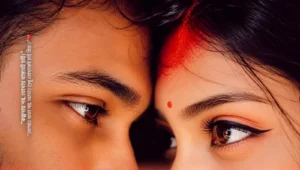
Ultra realistic close-up portrait of a young Indian couple, only their eyes and upper faces visible, lying face-to-face with foreheads touching. Intense emotional eye contact, cinematic mood, dramatic shadows, dark background. The girl has a small red bindi and vivid red sindoor smeared across her forehead and hairline, symbolizing deep love and commitment. Sharp focus on both eyes, highly detailed skin texture, natural eyebrows, soft diffused lighting, moody color grading, shallow depth of field, professional photography, emotional romantic atmosphere, 8K ultra HD, DSLR quality, symmetrical composition, realistic facial details, high contrast, masterpiece photography.
Photo Editing Workflow
Here is how the photo editing process works: first, select a reference image. Next, you can write your own prompt, but for the best results, we recommend copying and pasting a prompt from our website to ensure the image generates correctly. Then, generate the image using the AI tool. You can review the generated result; if it isn’t quite right, you can point out the flaws and ask for corrections. Once the image is finalized to your satisfaction, you can export it using the available button. If you have any doubts or questions about the process, feel free to ask us directly or consult ChatGPT; it will explain things clearly, making it easy for you to understand.
How to make Bengali couple AI photos look professional With Bengali Couple Eyes Contact Ai Photo Editing Prompts
Let’s learn how to make Bengali couple photo editing look professional and how to create it. To create it, first open Chat Secret and paste the prompt found on our website. Click on the plus sign to upload a photo and generate it. Your photo will be created and ready. To make it professional, first, whatever you’re solving, use a high-quality prompt, meaning a detailed prompt that explains everything easily, as I’ve provided on my website. Use that and select the proper Accept/Receive, as it’s selected. Leave it as it is. Don’t tamper with the Rishu, and you don’t have to do any realistic lighting settings. Otherwise, I’ve provided everything in the prompt. It will generate it automatically and give it to you. According to everything, you don’t have to do any elastic settings and the number comes that find this detail in enhancement in enhancement in detail enhanced enhancement you can enhance it. You can go and enhance it with any new application or any application. If your photo editing is enhanced then it is available, but if you want to do more work then you can get it done with other applications. After that you can upload your photo and go viral.