Notebook Drawing Ai Photo Editing Prompts – A new trend is currently circulating on Instagram where a normal photo is transformed into a notebook drawing. It looks like someone has hand-copied your portrait. This trend is created with the help of Google Gemini, which generates this effect from your regular photo. If you want to create this kind of drawing-style photo, I’ll show you how. I’ll explain how you can generate a sketch-like photo from a completely normal photo using Google Gemini. I’ll provide you with a perfect guide, explaining this editing process and many other editing techniques as well.
Notebook Drawing Ai Photo Editing Prompts
What is notebook drawing? It’s like a real photo, but in a drawing style. In notebook drawing, you create a drawing on your notebook using a pen or a pencil. It’s done by hand, and it requires a lot of skill. If you don’t know how to do it, you won’t get good results. But if you want excellent results, follow my instructions, and you’ll get the best results, guaranteed. Your edited photo will even go viral! It easily transforms a normal photo into a sketch-like image that looks very realistic, as if an artist drew your photo in a notebook.
What kind of photo should you use for notebook drawings?
This is the type of photo you should use. You can use any type of photo here. If you want good results, follow these ideas. Using them will give you even better results. You need to take the photo from a 45-degree angle from the front, and the lighting in your photo should be good. First of all, it should be a daytime photo. The background should be completely normal and clear, like you’re standing against a plain background. Keep it exactly like that. Your face should be clearly visible. This is what Google looks for in your photo. If these things are present, it will generate a great drawing of your photo. If you wear a checkered shirt, it won’t look good, and your drawing will turn out so bad that you won’t even like it yourself. Keep the background completely plain so that there are no difficulties in generating the drawing.
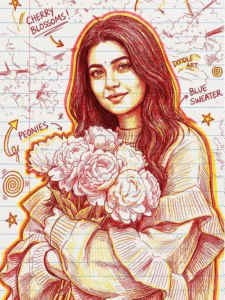
GENERATE A HAND-DRAWN
PORTRAIT ILLUSTRATION IN RED AND YELLOW PEN ON NOTEBOOK PAPER. INSPIRED BY DOODLE ART AND COMIC ANNOTATIONS. KEEP FULL LIKENESS OF THE SUBJECT, EXPRESSIVE LINES, SPONTANEOUS GESTURES. BOLD OUTLINE GLOW. HANDWRITTEN NOTES AROUND REALISTIC.
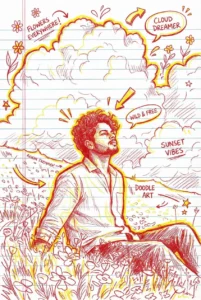
Generate a hand-drawn portrait illustration in red and yellowALL pen on notebook paper, inspired TFIT by doodle art and comic annotations. Keep a full likeness of the subject, expressive lines, spontaneous gestures, bold outline glow, and handwritten notes around. realistic pen stroke texture, 4K resolution. FLOWERS EVERYWHERE Don't change the face cut.
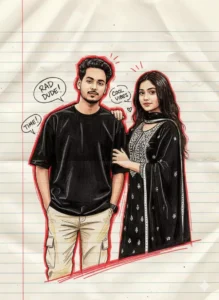
Generate a hand-drawn portrait illustration in red and yellow pen on notebook paper, inspired by doodle art and comic annotations. Keep full likeness of the subject, expressive lines, spontaneous gestures, bold outline glow, handwritten notes around, realistic pen stroke texture, 4K resolution.@robial.hosen.10
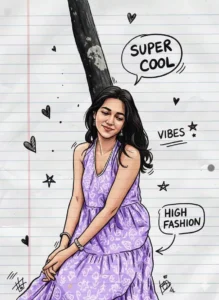
Transform the subject of the input image into a highly detailed digital illustration on a lined notebook paper background. The style must combine realistic shading with thick black pen outlines, resembling a detailed character sketch drawn in a sketchbook. Include random, hand-drawn doodle elements like hearts, stars, and arrows, along with several handwritten speech bubbles or text annotations floating around the subject (e.g., 'SUPER COOL', 'VIBES', 'HIGH FASHION').Use a vibrant, high-contrast color palette to fill in the clothes and accessories, while maintaining the texture of the paper beneath the drawing. Stylized sketch aesthetic.
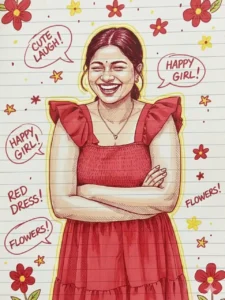
Generate a hand-drawn portrait illustration in red and yellow pen on notebook paper, inspired by doodle art and comic annotations. Keep full likeness of the subject, expressive lines, spontaneous gestures, bold outline glow, handwritten notes around, realistic pen stroke texture, 4K resolution
How to generate it now?
If you’ve come here, you’re probably familiar with photo generation posts, so here you’ll first need to use a prompt. I’ve provided the prompt here. You just need to copy it from here. Copying is very simple; you’ll find a copy button here, or you can select and copy it. Then, below, you’ll find an option called “Generate Image,” which you can click to go to Google. Once there, first paste the prompt. After pasting, go to the plus icon and upload your photo. Then, click “Generate,” and your amazing photo, just like a sketch, will be ready. So, if you liked this editing method, please let us know.
Conclusion
Notebook drawings created with Google Gemini are one of the best and most unique trends today. If you like it, you should definitely try creating one, as many people have already done so on Instagram. You can convert your regular photos into notebook-style drawings. The results will be amazing. I hope this information was helpful, as I’ve explained everything, and your edited photos will look fantastic.