Watercolor Ai photo Editing Prompts – You may have noticed the watercolor-style photo editing trend that has been making waves on social media lately. People seem to really love it! So, we thought—why not share this editing technique with you and show you exactly how to do it? If you want to recreate this viral style yourself, you’ll be pleased to know that it’s actually quite simple to do these days. If you’re interested in learning the process, I can walk you through it step-by-step; simply follow along, and you’ll be able to create your own images with ease. To achieve this, we will be utilizing a tool like ChatGPT. If you aren’t familiar with it, don’t worry—in this article, I will explain exactly what it is and how to use it. I’ll also show you how to generate these images and help them go viral. Now, let’s take a look at the specific steps you need to follow to create your own masterpiece.
Details Of Watercolor Ai photo Editing Prompts
This editing will look similar to what you might have seen before, like a watercolor painting. What happens with a watercolor painting is that it’s completely different from a normal painting. The colors appear flowing, not that they’re completely stable. You won’t see sharp edges. They’re just there, but they won’t be sharp. It’s like a water surface. You’ll see a bit of the painting falling off the border. However, your photo will be properly visible there, and this unique style is popular with people, so you can try it too. In this article, we’ll demonstrate its creation in the simplest way possible. Creating it is very easy these days.
What do you need to create photos like this?
If you want to generate such images, it is quite simple. You simply need to utilize a specific prompt and ChatGPT; I will explain all the details regarding how to use them to create your photos. I have provided the necessary prompts within this article. Now, you just need to copy the prompt from here and paste it into ChatGPT. Once there, you will be required to upload your photo—you can upload a picture of yourself and your partner, or you can choose to create a solo image of just yourself. It all depends on the specific type of photo you wish to generate. That’s it—you can then proceed to create your image. I will walk you through the entire process in the following section.
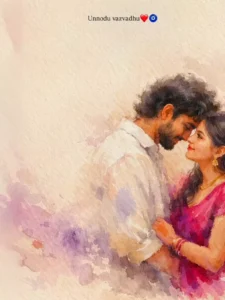
A romantic impressionist watercolor painting of a young couple standing close together in an intimate pose. The girl has long dark flowing hair with a small purple flower tucked near her ear, wearing a bright magenta dress that softly blends into the watercolor texture. The boy is dressed in a simple white shirt. The painting style is loose, blurry, and emotional, with soft brush strokes, smudged edges, and a dreamy unfinished look. The watercolor effect should feel expressive and fluid, with gentle color bleeding and natural paper texture visible. Background is minimal - plain textured beige paper like vintage parchment, with large empty negative space above the couple. The couple is positioned at the bottom-right corner of the frame, leaving wide space for text. Soft pastel watercolor splashes in purple and pink appear subtly around the edges.
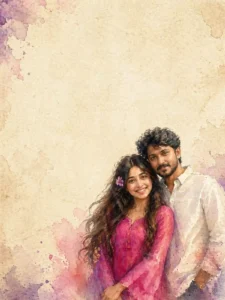
A romantic impressionist watercolor painting of a young couple standing close together in an intimate pose. The girl is looking up at the boy with love, while the boy gently looks down at her. The girl has long dark hair with a purple flower tucked near her ear, wearing a bright magenta dress. The boy is wearing a simple white shirt. The painting style is loose, blurry, and emotional, with soft brush strokes and smudged edges, giving a dreamy unfinished look.Background is minimal and plain textured beige paper, like vintage parchment, with lots of empty space above the couple. The couple is placed at the bottom-right corner, leaving wide negative space for text. Soft pastel watercolor splashes in purple and pink appear around the edges.Style: expressive watercolor + sketch wash, romantic cinematic mood, soft focus, painterly texture, gentle lighting, 4K high resolution, Instagram reel aesthetic.
How to Create Image In Chatgpt
To create a photo, the first step is to copy the prompt. You will find the necessary prompts provided within this article, and even more options will be made available in the future. Please continue to visit our website, as I am constantly introducing new content and innovative techniques here. What you need to do is simply copy the prompt; following that, you will find a link to ChatGPT—provided as a button—which you can click to navigate directly to the site. Once there, first paste the prompt, and then locate and select the “Create Image” option. Click on the plus (+) icon to upload one of your own photos, and then proceed to generate the image; the tool will transform your picture into something truly amazing, yielding outstanding results.
Conclusion
In this way, you can create this viral Instagram edit with great ease. I have shared all the editing details with you and explained everything clearly. Now, it is up to you to decide whether or not you wish to create it; rest assured, we will continue to bring you more such amazing editing tutorials, enabling you to create even more impressive photos, videos, and other content.