Viral Chibi Cartoon Style Ai Photo Editing Prompts – Friends, today I am going to share with you a fantastic photo editing style that is currently going viral on Instagram. If you create a photo using this technique, your engagement will skyrocket, and your post stands a great chance of going viral. So, let’s dive in and explore how this works, what it entails, why it has become so incredibly popular, and what makes this specific editing style so unique. Let me explain: this editing style involves taking a full-body photograph of yourself and placing several small, 3D-style cartoon characters alongside it—typically three or four characters in total. With the addition of some text or captions, the photo editing is complete. The final result looks incredibly aesthetic and cinematic, which is why everyone is rushing to create their own versions. Whether they aim to go viral or simply want to have fun by posting it to their Instagram Stories or status updates, this captivating editing style is something everyone is eager to try out.
What Is Chibi Photo Editing
What Is Chibi Photo Editing So, what exactly is photo editing, and what does the process entail? Let me explain. Essentially, photo editing involves digitally altering an image. In the modern era—as you may have observed—people are utilizing these tools to create their own photos, thereby saving money. This stands in contrast to the past, when people typically had to hire professional photo editors to create and customize their images for them. Nowadays, however, everyone is able to generate their own personalized photos without the need to seek out or pay an editor. The specific style of photo editing we are discussing involves taking your original photograph and incorporating several mini 3D cartoon characters—themed to match your image—positioned strategically around you: to your left, right, and center. Additionally, the background is blurred; this effect lends the image a highly cinematic quality, captivating viewers and inspiring them to create similar images of their own. So, let’s now explore how to create such images and learn a bit more about the process.
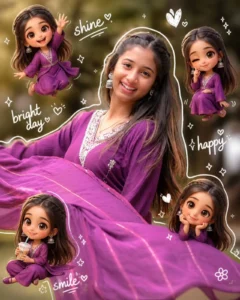
Use a real face as a reference photo. The background is the same as in the photo. The lighting is warm, soft, and clean, with subtle shadows. Around the image, add several mini chibi (3D cute style) versions of the character, While maintaining the original facial features. expressions: jumping cheerfully waving sitting relaxed holding a drink cute and playful expressions Add hand-drawn white doodle elements: outline around the main body stars, hearts, sparkles motion lines small cute icons Add aesthetic handwriting such as: "shine," "bright day,"happy,"smile," etc. (casual doodle font) Overall style: clean & aesthetic composition white sticker outline soft pastel color tone high detall 3D chibi glossy look cute Korean style instagrammable. 4:5
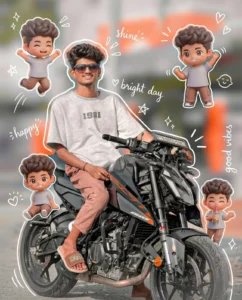
Use a real face as a reference photo.The background is the same as in the photo. The lighting is warm, soft, and clean, with subtle shadows. Around the image, add several mini chibi (3D cute style) versions of the character, while maintaining the original facial features.expressions: jumping cheerfully waving sitting relaxedholding a drink cute and playful expressions Add hand-drawn white doodle elements: outline around the main body stars, hearts, sparkles motion lines small cute icons Add aesthetic handwriting such as: "shine," "bright day," "happy," "smile," etc. (casual doodle font)Overall style: clean & aesthetic composition white sticker outline soft pastel color tone high detail 3D chibi glossy look cute Korean style instagrammable 4:5 ratio
Requirements Tools
Requirements Let me tell you exactly what you need to create this photo. The very first thing required—without which you cannot create the image at all—is ChatGPT. This is the specific application we will use to generate the photo. Since this app is currently trending significantly, most of you are likely already familiar with it; it is renowned specifically for its image-generation capabilities, making it an absolute necessity for this process. Next, you will need a full-body photograph of yourself—ideally one featuring a good background—to ensure that the final edited image looks truly aesthetic and spectacular. Once you have that, you will also need a “prompt.” After all, you can only generate the image if you have the right prompt! Without it, nothing can be created. I have provided the necessary prompt within this post; simply copy it, paste it into the application, and generate your image—it’s that easy!
How To Creat This Type Of Photo
And what everyone’s been waiting for: how to create this photo? Creating this photo is very easy, and I’ll explain it. To create this photo easily, you need to open the Chat Secret application. Once you open it, you’ll see an interface. Select the “Create Image” option and paste the prompt. This prompt has been provided from our website. Copy the prompt from there and paste it there. You can upload a full-size photo (called “Full Photo”). Upload it, generate it, and send it. It will take a while to create your photo. It may take a minute or two, but the result will be excellent. It takes time and creates very good photos. It’s not charging you any money. So, if it deletes a bad photo, you can tell it to keep the face 100% match. If there’s any flaw, tell it again so it can fix it. He’ll create and edit your photo, and give it to you for free.