Trending Motion Clone Ai Photo Editing Prompts – Friends, let’s explore a new photo editing trend that is currently going viral on Instagram. If you are an active Instagram user, you have likely noticed a multitude of photos circulating widely across the platform. These photos often feature unique styles—and the one we are discussing today is certainly one of them. The “Motion Clone” photo editing style has become incredibly viral—to an extent that is truly remarkable. I will guide you through the entire process, explaining exactly how you can create and replicate this look yourself. I will provide full, detailed instructions so that you can create this type of photo with absolute ease. So, without further ado, let’s dive in! Let’s discover what this photo editing trend is all about, how to edit it, and what tools to use to ensure your final result looks highly aesthetic and absolutely stunning. Through this article, we will address and clarify all your doubts regarding this trend.
Why Is This Photo Editing Viral ?
We’ll first explore the nature of this motion clone photo editing. Despite all the other photo editing methods, why is this photo editing so viral? I’d like to tell you that there’s definitely something special about this photo editing. The reason this photo editing is so viral is that when we see it, we find it appealing, and we also want to. The first thing we notice when we see it is the lighting, which is so captivating that everyone is captivated. After this lighting, you’ll see a black cinematic flash. It’s visually striking, which is why it’s so appealing. Beyond that, there’s a large text above it, and a long, blurred image surrounding it, corresponding to your cloned photo. It also looks incredibly cinematic, making it resonant with everyone. If it’s resonant, it goes viral. Any photo going viral depends on people’s preferences. If people like it, it goes viral. Similarly, this photo editing has become so popular that it has become so viral.
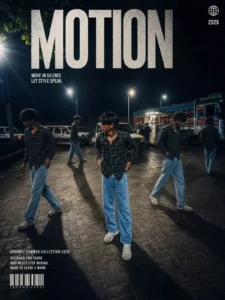
Transform my photo into a high-end cinematic streetwear follow and commer editorial poster. Keep my face, body, pose, outfit, and original background recognizable, but enhance everything into a luxury fashion campaign aesthetic. Add 4 realistic duplicate versions of me across the frame placed naturally like motion-captured walk sequences. Keep the main/front version largest, sharpest, and most detailed, while side clones are slightly faded or motion blurred. Use dramatic overhead lighting with a subtle glow, deep shadows, long floor shadows, cool-toned cinematic color grading, strong contrast, glossy highlights, and soft film grain. Make the outfit textures crisp and premium. Add bold oversized magazine-style typography in the top corner with on8.4K powerful word related to movement or style (example: MOTION, STATIC, RUSH, ECHO). Include smaller minimal tex such as collection year, slogan, barcode, or campaign details.
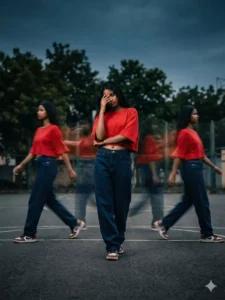
A cinematic streetwear photoshoot of a teenage girl standing on an outdoor basketball court, outfit a oversized red crop top and dark blue baggy Jean's, don't change face,, head slightly down covering face with hand, natural pose, multiple motion clones of the same person walking around him creating a motion blur effect, dramatic lighting, dark moody sky, high contrast, sharp focus on main subject, depth of field, fashion editorial style, urban environment, trees in background, realistic shadows, 4k ultra realistic, nike style campaign
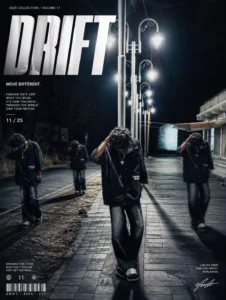
A cinematic streetwear photoshoot of a teenage boy standing on an outdoor basketball court,don't change out fit, face, head slightly down covering face with hand, natural pose, multiple motion clones of the same person walking around him creating a motion blur effect, dramatic lighting, dark moody sky, high contrast, sharp focus on main subject, depth of field, fashion editorial style, urban environment, trees in background, realistic shadows,
4k ultra realistic, nike style campaign, poster design.A cinematic streetwear photoshoot of a teenage girl standing on an outdoor basketball court, outfit a oversized red crop top and dark blue baggy Jean's, don't change face,, head slightly down covering face with hand, natural pose, multiple motion clones of the same person walking around him creating a motion blur effect, dramatic lighting, dark moody sky, high contrast, sharp focus on main subject, depth of field, fashion editorial style, urban environment, trees in background, realistic shadows, 4k ultra realistic, nike style campaign
Pro tips To Create This Photo
This Photo I am going to share some “pro tips” that, when applied during the photo editing process, will ensure your final results look incredibly stunning, aesthetic, and cinematic. So, let’s dive right in. The first tip is this: whenever you are utilizing this tool—specifically when you are about to generate a photo using ChatGPT—make sure to upload a high-quality image of yourself (such as an HD photo) before pasting your prompt and initiating the generation. By doing so, the resulting image that is produced will also be of high quality. The second tip is that if you select a “free image” option while pasting your prompt—and then proceed to create the image—the results will be even more impressive. Furthermore, when generating a photo, using a standard selfie of yourself works exceptionally well and will yield fantastic results. However, if you attempt to upload a photo of yourself wearing a mask or similar accessories, the AI may struggle to accurately interpret or “read” the image; this can lead to facial mismatches and poor overall results, potentially leaving you to believe that the prompt itself is ineffective or flawed. Therefore, for the best outcomes—resulting in a stunning and aesthetic final image—it is highly recommended that you generate your photos using images where you are not wearing a mask or face covering.
How To Creat This Photo
So, finally—to learn how to create this specific photo—the first step is to open the ChatGPT application. Before opening it, however, you need to copy the necessary “prompt” from our website. The prompt contains all the detailed instructions on exactly how your photo should be generated; essentially, the prompt is the most critical element—without it, your photo cannot be created. Simply paste the prompt into the application, upload one of your own photos, and hit “Generate.” Your photo will be ready in no time. The result will be so incredibly aesthetic that you won’t be able to believe it was generated using AI; you’ll find yourself thinking, “I used to pay professional editors to edit my photos, but now I can get them edited for free!” I have already provided the prompt for this specific style. If you are interested in finding more prompts and editing resources like this, I encourage you to visit our website daily, where I regularly share new editing tips and tricks.