Rani Pari Ai Photo Editing Prompts – Let me explain the “Rani Pari” photo editing trend to you. You might be familiar with the TV show Baalveer—it was a favorite among boys and girls alike. The show featured various characters, including “Rani Pari” (Queen Fairy). Whenever someone needed her help, they would call out, “Rani Pari, grant me power!” This trend has gained massive popularity because it has gone viral online. It stands out due to its unique content; people are taking photos, editing them to transform them into videos, and adding trending songs before uploading them. The use of these viral songs contributes significantly to the trend’s reach on platforms like Instagram Reels. Additionally, photos featuring the “Rani Pari” look—specifically those with a pink aesthetic—are going viral.
What does the ‘Queen Fairy’ look Entail?
Let me tell you what the “Queen Fairy” look is all about and why it is going so viral. First, there is the pink dress—specifically, a pink-colored outfit that makes the photo stand out. Second, it features fairy wings, which add to the appeal and make the look even more attractive. Third, there is a crown and a glow effect; the subject wears a crown, and the added glow makes the image look captivating and cinematic. Fourth, there is a “cute princess” background, often set at night—nighttime backgrounds tend to go viral because they look incredibly attractive and cinematic. Finally, a “soft beauty” filter is applied, further enhancing the photo’s appeal. These are the key elements that define the Queen Fairy look.
How to choose the best photo for editing?
To get the best results, you need to choose the right photo for editing. Here is how to go about it: first, ensure you use a photo where your face is clearly visible—meaning the image is sharp and your face is fully distinct. Secondly, select an image with good brightness and lighting; choosing a well-lit, bright photo ensures the final result looks vibrant. Thirdly, a photo with a simple background works best; a simple background makes it easier for the editing process to accurately interpret the image, resulting in a look that is both aesthetic and somewhat cinematic.
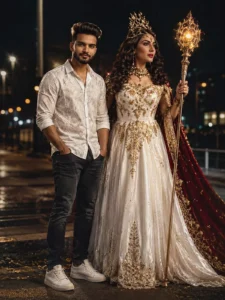
CREATE AN ULTRA-REALISTIC CINEMATIC NIGHT PORTRAIT OF A STYLISH YOUNG MAN STANDING CONFIDENTLY BESIDE A FANTASY QUEEN-LIKE WOMAN ON A ROADSIDE AT NIGHT. THE YOUNG MAN IS WEARING A WHITE PATTERNED SHIRT, DARK JEANS, AND SNEAKERS WITH A CALM EXPRESSION. THE WOMAN IS DRESSED IN AN ELEGANT WHITE ROYAL GOWN WITH GOLDEN DETAILS, WEARING A LUXURIOUS CROWN AND HOLDING A GLOWING ORNATE STAFF, WITH A FLOWING RED CAPE BEHIND HER.
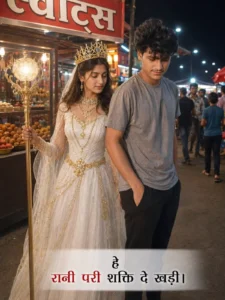
Night street-market photv, Rani Pari-style fairy queen in white gown with golden chains, crown and glowing staff standing beside a young man in grey t-shirt, dark pants and black slides. Use exact faces from reference images. Hindi sweets shop ("स्वीट्स") in background, realistic smartphone candid shot, natural night lighting. Text: "हे रानी परी शक्ति दे खड़ी। रानी परी
How to make editing better
To make your editing smoother and your photos look more aesthetic, the first step—regardless of the editing app you use—is to incorporate natural skin tones; this makes your photos look great and significantly boosts their viral potential. Secondly, avoid using excessive effects; overdoing it makes the photo look bad and causes your reach to drop. Thirdly, keep the face looking clean, as a clean look enhances the overall appeal. Finally, ensure you edit and export in HD; exporting in HD significantly increases the chances of your content going viral.
How To Creat Image With Rani Pari Ai Photo Editing Prompts
I have already covered most of the details; the only things left to discuss are the editing process and how to create your photo. To do this, first open the ChatGPT application. Upon opening it, you will see various options on the main screen; simply click the plus (+) icon and select the “Create Image” option. Next, tap the plus icon again to upload a clear photo of yourself. Then, visit our website to copy the prompt and paste it into the app. Finally, hit “Generate,” and within moments, your photo will be ready—featuring a highly aesthetic and cinematic look