Scrapbook Style Ai Photo Editing Prompts – If you are active on social media, friends, you must have noticed that AI photo editing is currently trending significantly. Every day, a new style of photo goes viral—one where people transform their ordinary snapshots into cinematic masterpieces, often sharing tutorials on how they achieved the look, which helps their images spread even further. If you, too, wish to create these kinds of trending AI-edited photos, I am going to provide you with a unique and trending AI photo editing prompt in this article today. Specifically, I am sharing a selection of aesthetic-style editing prompts—specifically those in the “scrapbook” style—that you can use in tools like ChatGPT or Gemini to generate your own trendy, scrapbook-style images. If you would like to learn the step-by-step process, simply follow along with this article.
Details Of Scrapbook Style Ai Photo Editing Prompts
Let me explain exactly what kind of editing is involved in this “scrapbook-style” photo editing. As you will observe, this style features a collage-like arrangement where various small images are incorporated alongside your main photograph. Typically, a central image sits in the middle, surrounded by other photos of you—each capturing a different look or a cute pose. Additionally, the design features a paper-like background, giving the impression that the collage was created on a sheet of notebook paper. The overall aesthetic is rich in visual appeal, complete with handwritten-style notes, ensuring the final image aligns perfectly with a cohesive aesthetic theme. Friends, in this article, I have provided you with a selection of specific image prompts; using these, you can leverage AI tools to generate your very own scrapbook-style images.
What You Need To Perform This Editing?
To create this trending AI photo edit, you will need a few things. First, you must have a reference image to serve as a guide for generating your new picture; this ensures that the face in the resulting AI image matches the original. Therefore, prepare a reference image that clearly shows the face. Second, you will need an AI tool capable of generating images based on a text prompt and your reference image. Since many people these days are using ChatGPT to generate high-quality images, you too can utilize it to create your own images completely free of cost. I will now guide you through the process of generating images using ChatGPT; you can refer to the “How to Use” section for instructions.
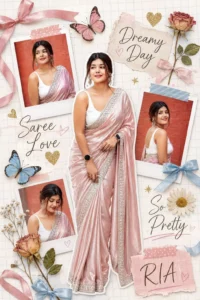
A scrapbooked digital collage on a white grid paper background. The layout features multiple polaroid-style cutouts and a central full-length cutout of a woman wearing a shimmering blush pink silk saree with silver embroidered borders. The collage is decorated with whimsical elements: soft pink and blue ribbons, gold glitter hearts, pressed dried roses, daisies, and delicate butterflies. Hand-written elegant script text reads "Dreamy Day," "Saree Love," "So Pretty," and "SIA."
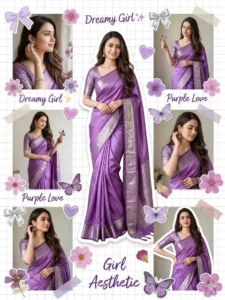
Dreamy scrapbook collage aesthetic of a girl in a shiny pastel pink saree, multiple angles and poses. Added stickers: bows, flowers, hearts, butterflies. White grid background, cut-out effect, cute decorative elements. Soft lighting, smooth skin, feminine aesthetic, Pinterest-style moodboard, ultra high quality.
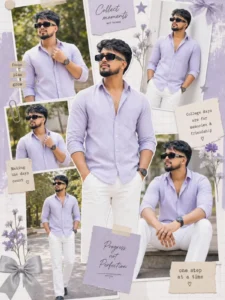
Dreamy scrapbook-style college aesthetic featuring a young man in a soft dusty lavender/light purple button-down shirt paired with crisp white trousers. The shirt is relaxed yet tailored (not baggy), with sleeves rolled up to the forearm for a casual, effortless vibe. Styled with dark rectangular sunglasses, a subtle silver chain, and a bold black-faced wristwatch to add a grounded, slightly rugged contrast to the pastel outfit. Multiple angles and poses (standing, leaning, walking, candid expressions) arranged in a Pinterest-style moodboard layout. Include decorative scrapbook elements like stickers, minimal bows, abstract shapes, sübtle masculine florals, stars, and paper cutouts. White grid background with clean cut-out photo layering effect. Soft natural lighting, smooth skin tone, airy highlights, and a calm spring/summer resort vibe.Overall aesthetic: soft yet masculine, modern college vibe, effortlessly stylish, slightly editorial.
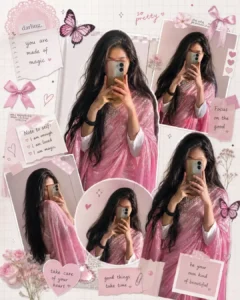
Dreamy scrapbook college asthetic for a girl in a shiny pink colour saree, multiple angies and poses, added stickers bows, flowers, hearts, butterflies.white grid background cut out effective cute decorative elements soft lighting, smooth skin, feminine asthetic.pinterest style moodborad ultra high quality and no change girl and pic size 1080×1350.
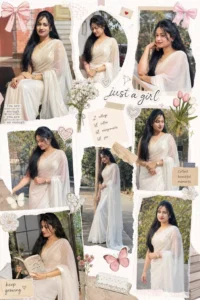
Create a high-quality aesthetic scrapbook-style collage poster of a young South Indian girl. Maintain strict face preservation, natural skin tone, and realistic facial features. Main Subject: A smiling girl wearing a white printed kurti with subtle black patterns Long natural wet-style hair, soft golden-hour lighting Cheerful, shy expressions with candid poses (looking down, side profile, smiling) Traditional oxidized jhumka earrings and bangles Composition:Large main portrait on the right side (dominant focus) Multiple smaller cutout portraits (3-4) arranged creatively around One black-and-white polaroid-style photo frame at the top left Slight overlapping layers for scrapbook depth Design Elements:Soft beige / warm brown textured background Daisy flowers and small floral clippings scattered around Vintage newspaper cutouts and torn paper textures Handwritten notes / quotes in soft aesthetic fonts Tape pieces and paper scraps for realistic collage feel Extra Element (Important): Adda music player Ul design Include play/pause button (centered or near left side) Add progress bar line and small control icons ( ) Include handwritten text like "play song" near the controls Style & Mood: Warm, dreamy, cozy aesthetic Soft shadows and smooth blending Instagram / Pinterest-style scrapbook design Clean, high-resolution, visually balanced layout
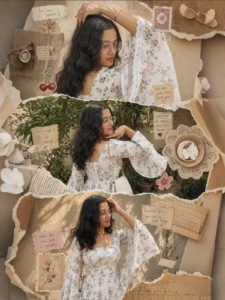
Ultra-realistic 3-panel vertical collage (top/middle/bottom) with the same girl in all panels. Wearing a white floral kurti with corset lace-up fit and bell sleeves. Top: close-up side pose, arm raised, warm light. Middle: back pose, hand under chin, smiling, garden daylight. Bottom: mid-shot front, hand on head, sideways look, golden sunlight. Add scrapbook elements: torn paper, vintage texture, cute stickers, stamps, handwritten notes. HD Pinterest aesthetic.
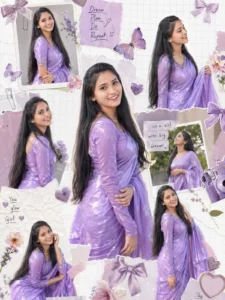
Create a romantic, scrapbook-style digital fan edit collage. The central focus is the same young Indian woman from the reference image (use her exact facial features, no alteration of identity). She is wearing a vibrant magenta saree, standing with her back partially facing the viewer, looking over her shoulder with a soft, cute smirk expression. Her long black hair flows naturally.
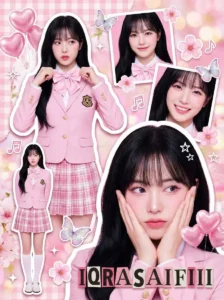
"A crowded, vibrant composition featuring multiple photographic cutouts of the same subject layered over a textured pink background.", "key_elements": "White sticker outlines around the subject cuts, sparkle effects, floating graphics, and ransom-note style text." }, "subject_details": { "demographics": "Young Asian woman (K-pop idol visual), fair porcelain skin, soft feminine features.","hair": "Long, voluminous jet-black hair with see-through bangs (air bangs). Styled straight or with very loose waves.", "makeup": "Pink-toned 'wonyoung' or 'douyin' makeup: gradient pink lips, heavy pink blush on apple of cheeks and nose tip, glitter eyeshadow, sharp eyeliner.", "jewelry": "Pearl drop earrings, delicate silver necklace, silver rings, and a baby pink digital watch (Casio style) with a beaded bracelet." }, "outfit_details": { "style": "High-teen / Preppy School Uniform.", "garments": { "outer": "Pastel pink fitted blazer with dark grey piping and a gold school crest emblem on the pocket.", "inner": "White button-up shirt.", "neckwear": "Large pink satin bow tie.", "bottom": "Pink and white plaid pleated mini skirt.", "legwear": "White knee-high socks.", "footwear": "White Mary Jane shoes." } }, "pose_layout_breakdown": { "main_portrait_bottom_right": "Large close-up. Subject holding both hands against her cheeks (flower pose), looking slightly to the side with a dreamy expression.", "upper_left_cutout": "Waist-up shot. Subject adjusting her bow tie with both hands, looking forward.", "full_body_insert_bottom_left": "Miniature full-body cutout. Standing straight with arms at sides, neutral sweet pose.", "top_right_cutout": "Headshot. Smiling gently at the camera.", "middle_right_cutout": "Close-up. Smiling brightly." }, "graphic_overlays": { "stickers": "Pink heart balloons, iridescent butterflies, cherry blossom flowers, music notes, white stars.", "text": "Ransom-note style text reading 'IQRASAIFIII' at the bottom.", "background_texture": "Pink gingham pattern mixed with floral textures and soft bokeh." }, "camera_technical_values": { "source_photography_style": "High-end Commercial Studio Portraiture.", "focal_length": "85mm (Flattering portrait lens for the cutouts).", "aperture": "f/4.0 (Sharp focus on subject faces).", "shutter_speed": "N/A (Collage).", "iso": "ISO 100.", "lighting_setup": "High-Key Beauty Lighting. Large bright softbox from the front to eliminate shadows on the face. Ring light reflections visible in the eyes.", "color_grading": "Pastel pink dominant, high saturation, slightly overexposed for a 'bloom' effect."
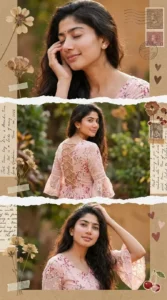
Create a high-definition vertical collage (9:16) using the reference image for exact facial features, skin tone, and expressions. Maintain strong facial similarity to the reference. Aesthetic: vintage scrapbook collage with three horizontal panels separated by realistic torn paper edges. Subject: a young Indian woman with long, wavy black hair, soft natural makeup, glowing skin, subtle smile. Outfit: black floral print dress with bell sleeves and lace details, elegant and feminine. Poses: ���Top panel: side pose, hand in hair, soft smile, warm natural light. ���Middle panel: turned back pose showing lace-up back detail, holding a black sling bag, smiling over shoulder, garden background with greenery. ���Bottom panel: relaxed pose, hand on hair, looking slightly down with a soft smile. Background: outdoor garden with trees, soft depth of field (bokeh). Decor elements: dried pressed flowers, vintage stamps, handwritten notes, torn paper textures, soft beige/brown tones.
Create a soft romantic scrapbook collage using the uploaded face as the ONLY face reference (keep face identical). Warm golden-hour lighting, pastel tones, flowers, and cozy aesthetic. Multiple rectangular photo panels, handwritten notes, tape elements, and a music player overlay. Dreamy, intimate mood.
How To Create Ai Image?
Friends, to perform this specific photo edit, you will need the assistance of an AI tool; you can choose to use either ChatGPT or Google Gemini. I will guide you through the process of creating an image using ChatGPT. First, copy any of the image prompts provided in this article. Next, open the ChatGPT application. Click on the ‘+’ icon to upload a photo of yourself in which your face is clearly visible. Then, paste the copied prompt and click ‘Generate.’ Within moments, your photo—edited to feature the ‘Radha Rani’ look—will be ready. The final result will possess a completely realistic and cinematic aesthetic.
Conclusion
In this way, you can easily create this viral scrapbook-style AI photo edit. This article provides a selection of image prompts that you can use to effortlessly generate your own images. I hope you truly enjoy this trending AI photo editing style and that you found this article helpful. If you wish to create more such trending photo edits, you can visit this website to access a variety of other trending photo prompts.